

MediaOrganizer app icon

MediaOrganizer

Media Processing Workflow

A deterministic workflow for preparing media archives.

MediaOrganizer implements the complete media processing workflow described on this page. Each capability addresses a different archive condition, allowing every collection to use only the stages it actually needs before organization, cataloging, sharing, and long-term preservation.

Workflow overview

One workflow. Different archive conditions.

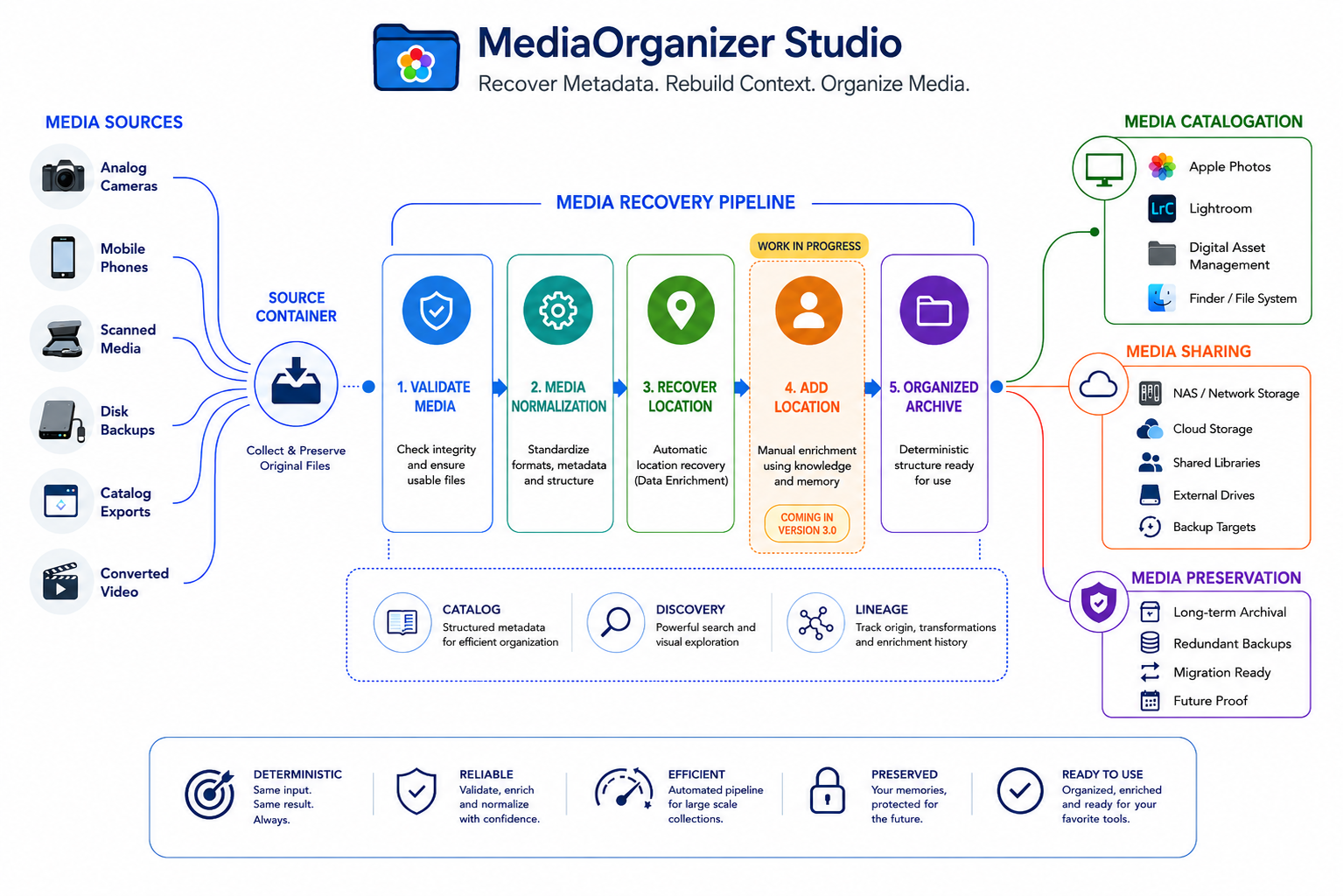
MediaOrganizer allows you to apply only the workflow stages your archive actually needs. Some collections only require organization, while others benefit from archive validation or geographic context recovery before they are ready for cataloging and long-term preservation.

MediaOrganizer media processing workflow from media sources through validation, normalization, geographic context recovery, organization, cataloging, sharing, and preservation.
The workflow is modular. Use only the stages required by the actual condition of the archive.

Workflow stages

Choose only the stages your archive needs.

Every capability below is implemented as an independent MediaOrganizer workflow. Apply only the stages your archive actually needs instead of forcing every collection through the same sequence.

Archive integrity

Validate Media

Identify unreadable, incomplete, damaged, or unusable media before organization and separate problematic files for review.

Use when
  • Files were recovered from damaged storage.
  • Old backups contain uncertain media.
  • Transfers or recovery operations may be incomplete.
  • The archive has accumulated over many years.
Structural consistency

Media Normalization

Prepare files for predictable organization by creating consistent file-level structure across mixed media sources.

Use when
  • Media comes from multiple cameras or phones.
  • Collections contain mixed formats and naming patterns.
  • Metadata characteristics vary across the archive.
  • Several libraries or folders must be consolidated.

Missing GPS metadata

Recover Geographic Context

MediaOrganizer provides two complementary approaches for media without GPS information, depending on whether sufficient archive context is available.

Automatic recovery

Recover Location

Reconstruct missing geographic information when the archive contains sufficient related context to support recovery.

Available now

Manual completion

Add Location

Assign locations manually when Recover Location cannot be used, including scanned photographs, analog collections, and historically isolated media.

Coming in MediaOrganizer 3.0

Final structure

Organized Archive

Produce a deterministic archive structure ready for Finder, Apple Photos, Lightroom, DAM platforms, backup, sharing, and long-term preservation.

The organized archive produced by MediaOrganizer is ready to be imported, cataloged, backed up, or preserved using the tools you already use.

Media lifecycle

Where MediaOrganizer fits.

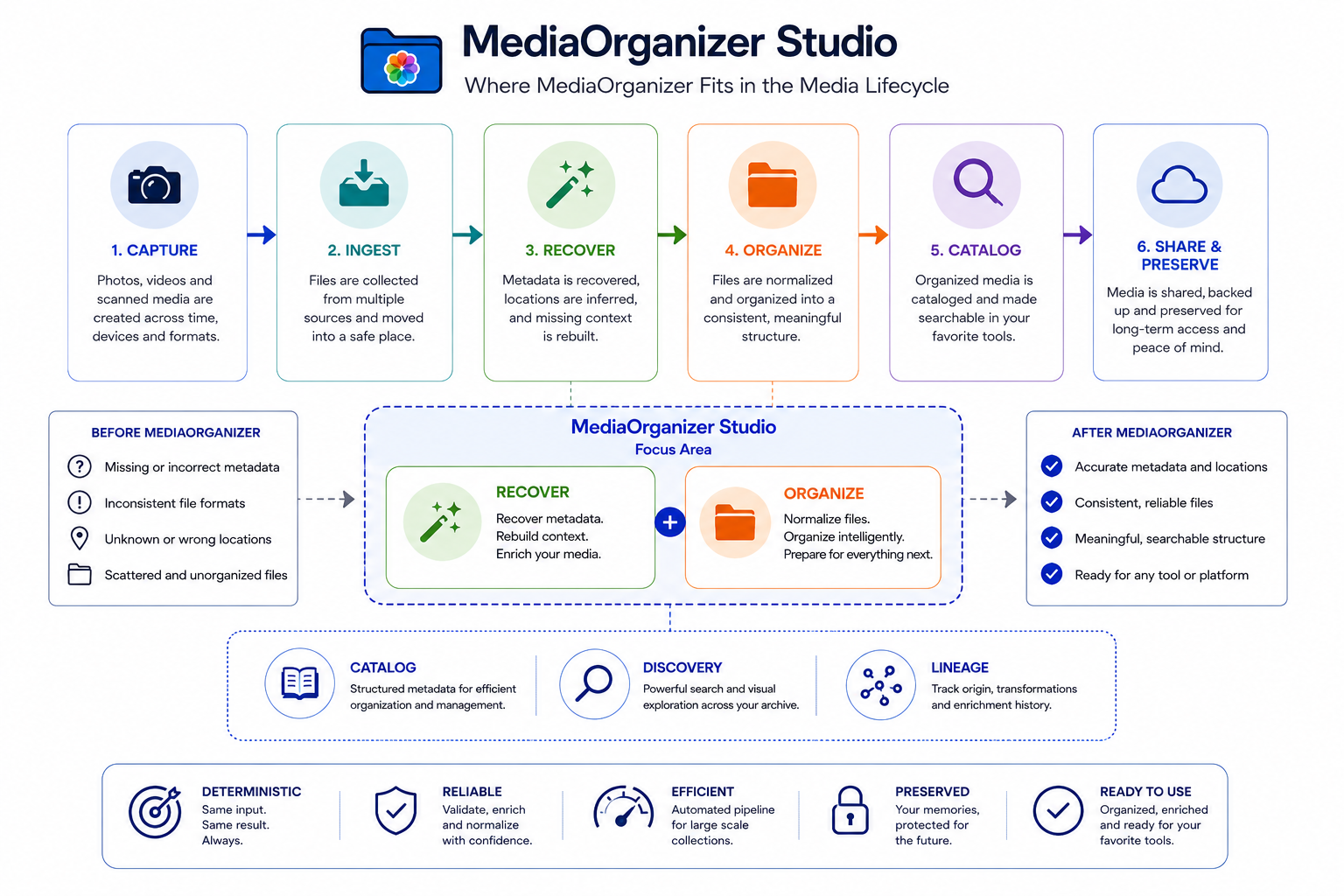
MediaOrganizer implements the preparation stage of the media lifecycle, working between media ingestion and cataloging to ensure files are validated, normalized, and enriched before they reach Apple Photos, Lightroom, DAM systems, sharing, or long-term preservation.

Media lifecycle showing MediaOrganizer focused on recovering and organizing media before cataloging, sharing, and preservation.

Design principles

Built for long-lived archives.

The workflow is designed to preserve control, visibility, and portability throughout the preparation of the archive.

Deterministic

The same input produces the same result.

Local

Files remain under your control on the Mac.

Transparent

Preview, progress, logs, and reviewable outcomes.

Scalable

Suitable for small collections and large historical archives.

Portable

Prepared for the tools and platforms you already use.

MediaOrganizer for macOS

Every archive has a different history.

MediaOrganizer implements the complete workflow described above, allowing you to apply only the stages your archive actually needs while producing a consistent, portable archive ready for Apple Photos, Lightroom, Finder, backup, sharing, and long-term preservation.