How to Manage a Large Photo Archive
A practical approach to keeping large media archives understandable, rebuildable and structurally consistent across years of growth.
This guide follows a file-level media normalization approach.
Why large archives become difficult to manage
A small photo collection can tolerate inconsistency for a long time. A large archive cannot.
Once a collection grows across years of devices, drives, imports, backups and editing workflows, every structural weakness becomes more visible.
Common symptoms include:
- photos spread across multiple drives,
- overlapping backups,
- mixed folder naming schemes,
- duplicate imports from old devices,
- missing GPS on parts of the archive,
- catalogs compensating for folder chaos underneath.
At that scale, the problem is no longer just “where are my photos?” It becomes “what is the actual structure of this archive?”
The mistake many people make
A common reaction is to keep adding more layers: more folders, more backup copies, more catalogs, more manual cleanup, more exported versions.
That may temporarily improve visibility, but it usually does not solve the underlying structural drift.
Large archives become manageable only when the file layer itself becomes coherent.
What large archives need most
At scale, the archive needs more than convenience. It needs structure that remains reliable over time.
A strong large-archive workflow should be:
- deterministic – the same files should organize the same way if processed again,
- rebuildable – the archive should not depend on one fragile catalog state,
- auditable – duplicates and uncertain items should be explicit,
- portable – understandable outside one single application,
- scalable – able to grow without becoming opaque.
Why folder history is not enough
In large collections, old folder structures often describe the history of imports rather than the identity of the media.
You may find folders such as:
Old Mac PhotosExternal Backup 2Recovered Camera UploadsTrip Final FinalPhone Export
These labels are understandable in the moment they are created, but they are weak foundations for a long-term archive.
A better approach: normalize the file layer first
Large archives become easier to manage when the file layer is normalized before any catalog or DAM tries to make sense of it.
That means treating each media file as the canonical unit and deriving structure from intrinsic metadata rather than from inherited source folders.
In practice, this often means using:
- capture metadata as chronological identity,
- GPS metadata as location context when available,
- consistent organization model to make the archive rebuildable.
Why large archives need a canonical target
One of the biggest structural improvements is to stop thinking of old source folders as permanent structure.
Instead, the archive should be rebuilt into a canonical target: one destination that represents the normalized file layer.


How a deterministic structure helps at scale
In a large archive, consistency matters more than clever folder names.
A deterministic hierarchy helps because it reduces ambiguity. Instead of manually improvising structure year after year, the archive follows repeatable rules.
A common strong pattern is:
a stable hierarchy based on reliable date and location context
combined with deterministic filenames based on reliable capture metadata and location context when available.
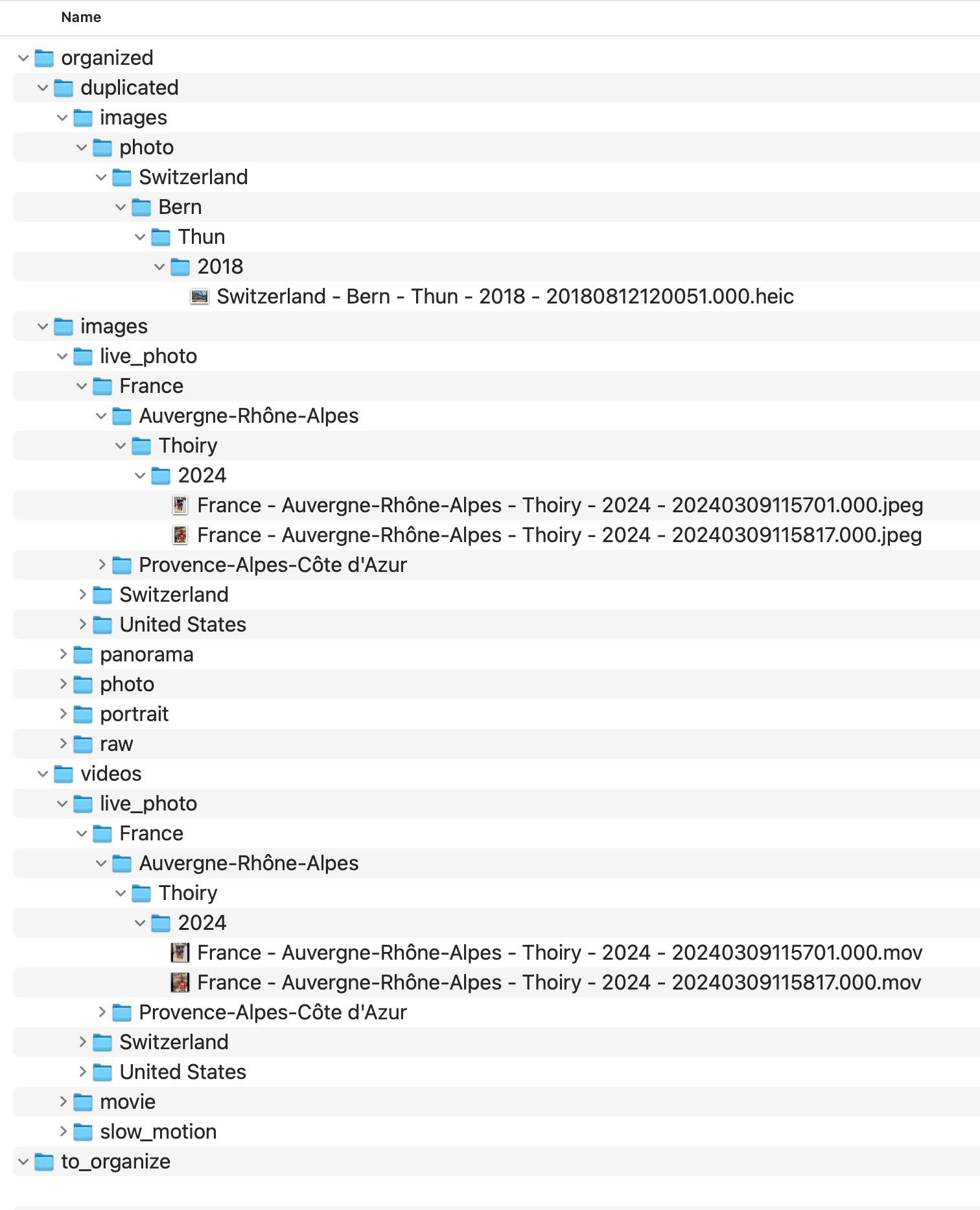
Why duplicates become more dangerous in large archives
In a small archive, duplicate problems are inconvenient. In a large archive, they distort understanding of the collection itself.
Duplicate candidates may come from:
- overlapping backups,
- repeated imports,
- device migrations,
- exports next to originals,
- multiple copies of the same historical trip.
At large scale, these should be isolated explicitly rather than mixed into the main structure.
Why uncertainty should be visible
Big archives always contain uncertainty: files with no GPS, ambiguous duplicates, old media with incomplete metadata.
A good archive does not hide those cases. It makes them visible and reviewable.
That is why deterministic workflows often use explicit areas such as:
- a duplicate review area
- an explicit review area for missing location context
These are not signs of failure. They are signs that the archive is being handled honestly.
What MediaOrganizer does differently
MediaOrganizer was designed around the idea that archive structure should exist at the file level, not only inside a catalog.
It organizes media into a normalized target, uses consistent organization model, isolates structural collisions, and keeps missing-location items explicit for later review.
This is especially valuable for large archives because scale amplifies every structural weakness.
Why this matters before Lightroom, Apple Photos or any DAM
Catalog systems are useful for browsing, indexing and searching media, but they do not automatically fix years of structural drift underneath.
If the underlying archive is inconsistent, the catalog inherits that inconsistency.
Once the file layer itself becomes coherent, the catalog is no longer compensating for archive chaos. It is simply indexing an already normalized archive.
Practical principles for managing a large archive
- Stop treating old source folders as canonical structure.
- Normalize into a new target instead of endlessly reorganizing inherited folders.
- Use metadata-driven structure wherever possible.
- Keep duplicate candidates explicit.
- Keep no-GPS files explicit.
- Prefer rebuildable rules over manual improvisation.
- Think of the catalog as an index, not as the archive itself.
FAQ
What counts as a large photo archive?
There is no single threshold, but once the collection spans many years, devices, drives and workflows, structural consistency becomes more important than folder convenience.
Why do large archives become hard to manage so quickly?
Because every inconsistency compounds over time: duplicate imports, backup overlap, naming drift and old workflow remnants all accumulate.
Should I manage the archive only inside a catalog?
Catalogs are useful, but long-term archive strength is better when the file layer itself is coherent and portable.
What should I do with missing GPS items in a large archive?
Keep them explicit for later review instead of silently forcing guessed locations into the main archive.
Where media normalization fits
The file-level problem described in this guide is one part of a broader media normalization workflow: establishing deterministic structure, explicit exceptions and tool-independent organization before relying on Lightroom, Apple Photos or any DAM system.
Related guides
- Best Folder Structure for a Long-Term Photo Archive
- How to Merge Photo Folders Without Creating Duplicates
- Why Duplicate Photos Happen in Large Photo Archives
- Preparing Photos Before Importing into Any DAM