Best Folder Structure for a Long-Term Photo Archive
A practical way to design a deterministic archive structure that remains understandable across years of devices, drives, imports and migrations.
This guide follows a file-level media normalization approach.
Why folder structure matters more over time
A folder structure that works for a small collection often breaks down as the archive grows. What begins as a few camera folders can become years of imports, backups, exported edits, device migrations and partially overlapping libraries.
In long-lived archives, folder structure is not just visual organization. It becomes part of whether the collection remains understandable at all.
A good long-term structure should survive:
- new devices,
- new computers,
- new storage drives,
- catalog changes,
- library migrations,
- years of growth.
Why many photo folder structures drift over time
Most archives are not built from one consistent plan. They accumulate incrementally.
Typical folder structures end up reflecting:
- old hardware names,
- temporary import locations,
- camera card names,
- editing exports,
- manual cleanup decisions made years apart.
That means the visible structure often describes the history of the workflow rather than the identity of the media.
What makes a folder structure strong in the long term
A strong archive structure should be:
- deterministic – the same file should always end up in the same place if processed again,
- portable – understandable outside any one app or catalog,
- auditable – uncertainty and collisions should be visible,
- scalable – able to grow from thousands to hundreds of thousands of files,
- metadata-driven – based on intrinsic file information rather than inherited folder names.
Why old folder names are weak archive foundations
Folders such as:
New Mac importPhone backupVacation finalSorted old photosDCIM
may make sense at the moment they are created, but they are weak long-term archive anchors. They describe temporary workflow context, not durable archive identity.
Over time, these labels lose meaning and create structural drift.
A better approach: structure around metadata
In a deterministic archive, the structure is derived from metadata that travels with the file itself. The two strongest signals are usually:
- capture timestamp
- GPS/location metadata, when available
This makes the archive independent from the source folder logic that happened to exist before.
What a durable folder structure should achieve
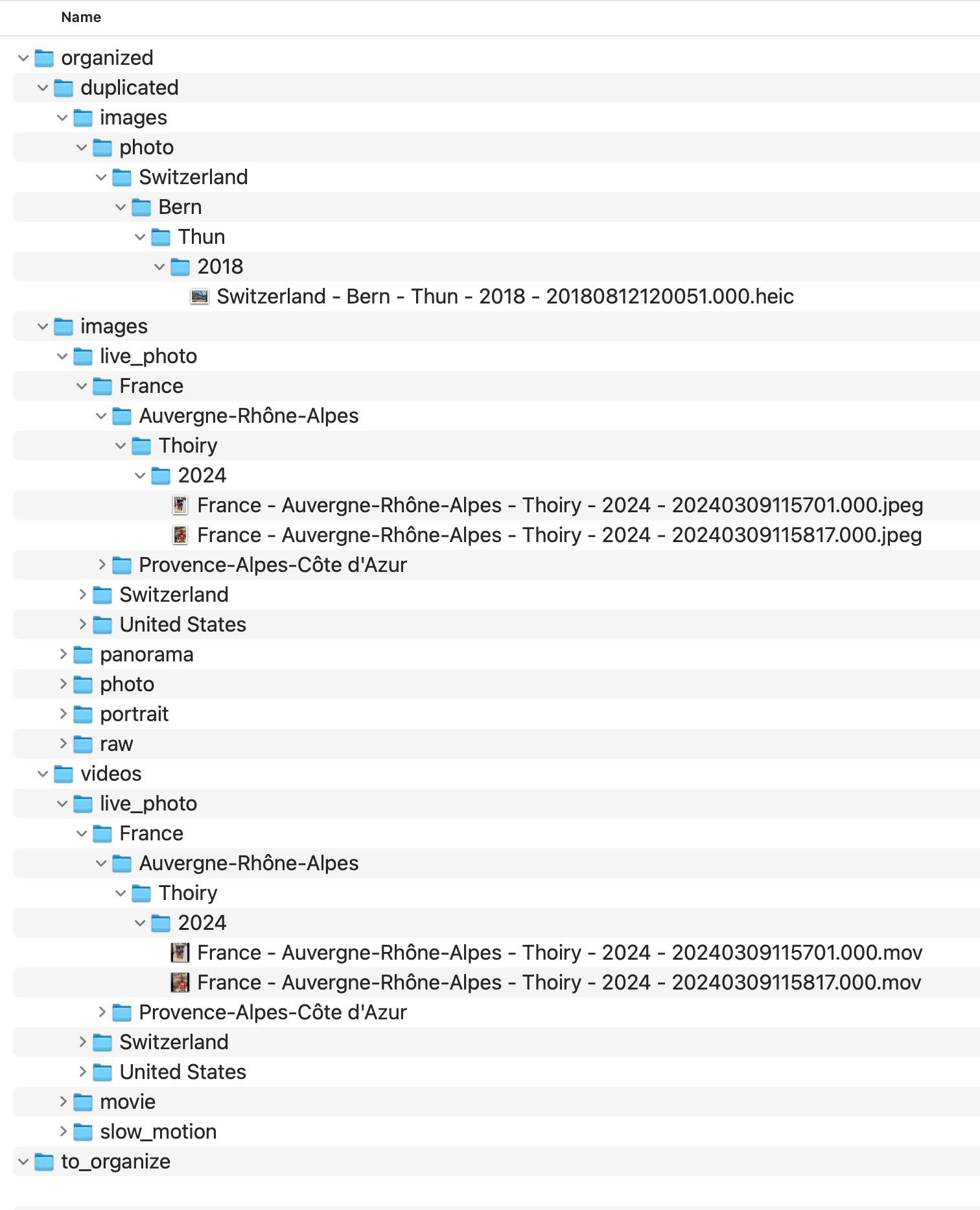
A robust archive should be human-readable, stable across devices, and honest about what is known and unknown. The exact hierarchy is less important than the discipline behind it: context should come from reliable file evidence, not from accidental source folders inherited over the years.
If location or date context is unavailable, the archive should not pretend otherwise. Uncertainty should remain visible for later review.
Why filenames should also be deterministic
Folder structure alone is not enough. In long-lived archives, filenames should also carry stable identity.
Relying on inherited camera names such as IMG_1234.JPG is fragile because:
- devices reuse numbering,
- different sources can produce the same pattern,
- exports may generate new names,
- folders alone do not resolve ambiguity well enough.
A deterministic archive benefits from filenames that remain stable across devices and migrations. MediaOrganizer handles the underlying naming decisions internally so users do not need to design or maintain those rules themselves.
What to do with duplicates and uncertain items
A long-term structure should not hide uncertainty.
Two common cases need explicit treatment:
- duplicate candidates – files that collide structurally and should be reviewed instead of blindly deleted,
- missing GPS items – files without usable location metadata that should remain explicit.
These are not failures of the structure. They are part of making the archive auditable and honest, and they are handled explicitly by MediaOrganizer rather than left to manual folder scripting.
What MediaOrganizer does differently
MediaOrganizer rebuilds the archive into a normalized target instead of preserving the accidental folder logic of the source.
Source folders, Photos libraries and drives may all reflect different historical workflows. The target is where the archive becomes canonical.


Why this matters before any catalog or DAM
Catalog systems are useful for indexing and browsing media, but they do not automatically fix structural inconsistency at the file level.
If the folder structure underneath is unstable, the catalog inherits that instability.
Once the archive itself has a deterministic structure, Lightroom, Apple Photos or any DAM can operate on top of a coherent file layer instead of compensating for years of folder drift.
Principles for a durable archive structure
A durable archive should avoid device-specific folder history, keep uncertainty visible, preserve reviewability, and remain rebuildable over time. MediaOrganizer applies these principles as a maintained workflow instead of leaving users to assemble fragile one-off scripts.
FAQ
What is the best folder structure for photos?
For long-term archives, a metadata-driven structure is usually stronger than ad hoc device or event folders. The exact structure should be stable, readable, and based on reliable file evidence rather than accidental source folders.
Should I organize by event folders only?
Event folders may help locally, but they are often subjective and inconsistent over time. Long-term archives usually benefit more from deterministic time and location structure.
What should I do with files that have no GPS metadata?
Keep them explicit in a dedicated review area rather than forcing guessed locations into the archive.
Why should duplicate candidates be isolated instead of deleted?
Because large archives contain edge cases such as edited exports, metadata variations and overlapping backups. Isolation is safer and more auditable than blind cleanup.
Where media normalization fits
The file-level problem described in this guide is one part of a broader media normalization workflow: establishing deterministic structure, explicit exceptions and tool-independent organization before relying on Lightroom, Apple Photos or any DAM system.
Related guides
- How to Manage a Large Photo Archive
- How to Merge Photo Folders Without Creating Duplicates
- Why Duplicate Photos Happen in Large Photo Archives
- How Photo GPS Metadata Works