How Photo GPS Metadata Works
A practical explanation of how location data is stored in photo files and why it matters when building a deterministic long-term archive.
This guide follows a file-level media normalization approach.
Why GPS metadata matters
Photo archives are not only collections of images and videos. They are also collections of metadata: timestamps, device information, camera model, orientation, and sometimes geographic coordinates. Among those fields, GPS metadata is one of the most useful for turning an unstructured media collection into a deterministic archive.
When location metadata is present, it can help place a file into a stable folder structure, make filenames more meaningful, and reduce ambiguity when archives are merged across years, devices, backups, and drives.
What GPS metadata usually contains
In many photo files, location data is stored as part of EXIF metadata. Typical location-related fields include:
- Latitude – the north/south coordinate of where the photo was captured.
- Longitude – the east/west coordinate.
- Altitude – elevation, when available.
- GPS timestamp – sometimes present separately from the local capture timestamp.
- Direction / heading – available on some devices.
In practice, the most important fields for archive organization are latitude and longitude. Those two values are often enough to recover a human-readable location such as country, state, or city.
Where this metadata comes from
GPS metadata usually comes from the capture device itself:
- Smartphones often embed GPS automatically when location permission is enabled.
- Cameras may store GPS if they have built-in location support or a companion device.
- Edited or exported files may preserve or strip metadata depending on the workflow.
This is why two files captured minutes apart may behave very differently at the file level: one can contain reliable GPS coordinates while the other contains none.
How MediaOrganizer reads metadata
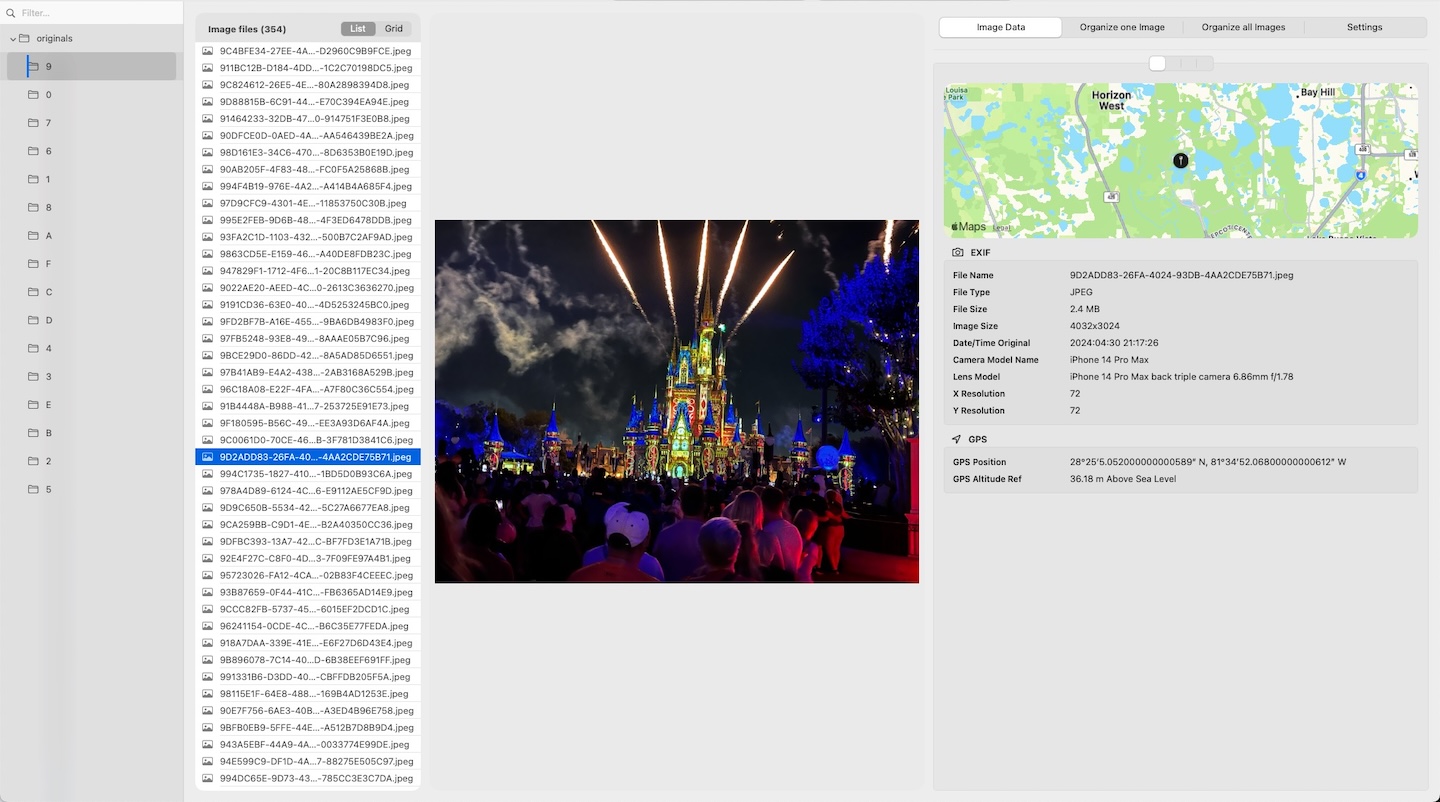
MediaOrganizer can inspect EXIF and GPS data for supported image files. When metadata is available, it can be displayed, reviewed, and in some cases updated safely in the Target.
The app is not intended to be a deep EXIF/XMP editor. Instead, it focuses on the fields needed to build and maintain a deterministic archive, including recovered GPS and location names when that recovery has been confirmed.
Why GPS metadata becomes inconsistent in real archives
Long-lived archives rarely evolve under one device and one workflow. Over time, inconsistency appears because:
- older cameras may not record GPS at all;
- some phones were used with location disabled;
- exports or sharing workflows stripped metadata;
- cloud and sync workflows preserved metadata unevenly;
- videos and photos may not carry the same metadata fields.
Real-world archives therefore tend to contain a mix of:
- media with reliable GPS metadata,
- media with partial metadata,
- media with no GPS metadata at all.
Why GPS metadata matters in a deterministic archive
In a file-level media normalization workflow, GPS metadata is not just informational. It becomes a structural signal.
It can help:
- build folder paths according to your naming rules,
- make filenames more explicit and stable,
- separate files that can be placed confidently from files that require review,
- reduce ambiguity when merging large archives from multiple sources.
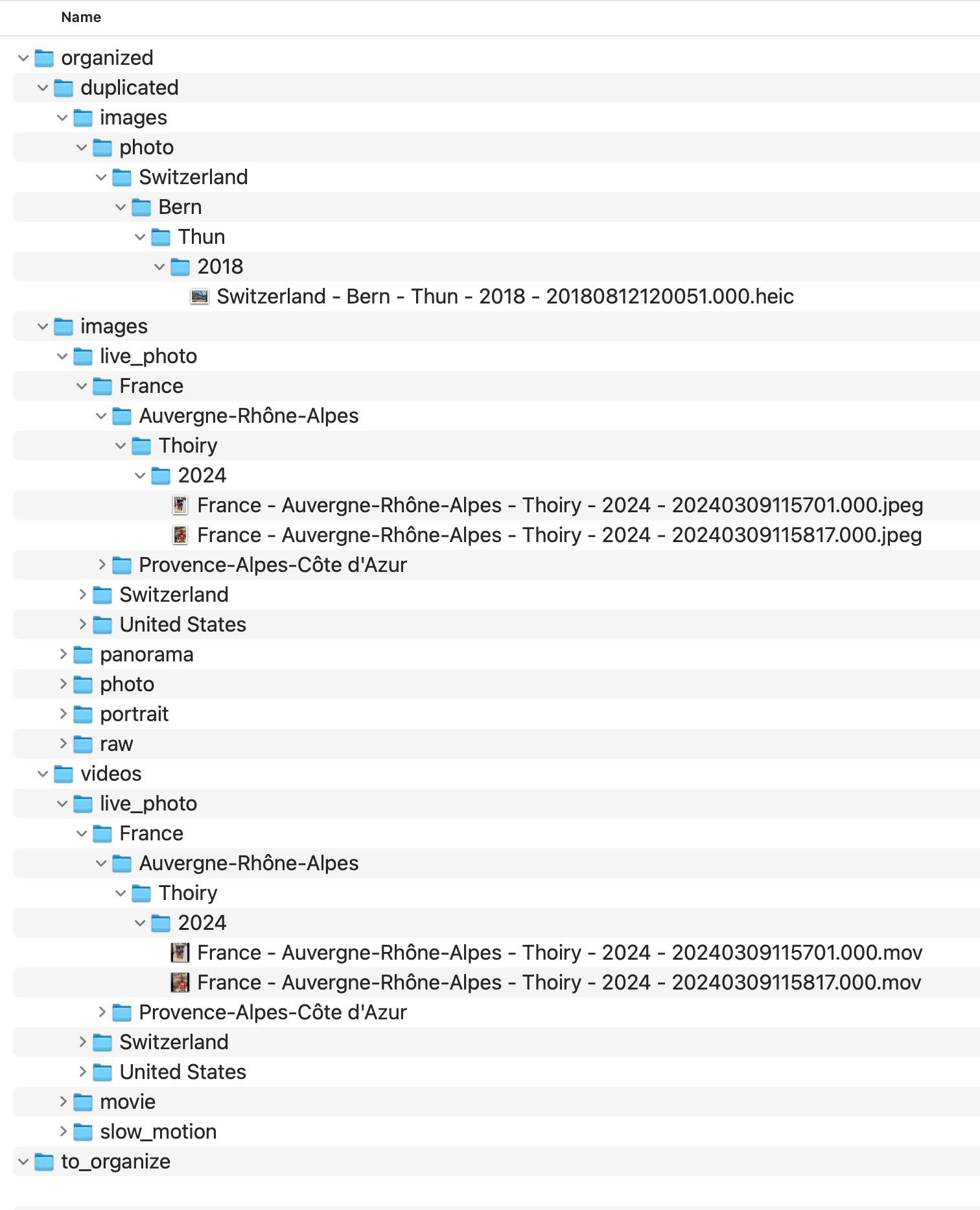
MediaOrganizer builds paths from semantic rules rather than from old device folders or import history. The destination path starts from a semantic root and then follows the selected naming fields. Filenames always include a precise timestamp, and files without location can be handled explicitly instead of being guessed silently.
What happens when GPS is missing
Missing GPS metadata does not make a file unusable. It simply means the file has less intrinsic context. In MediaOrganizer, those items are not discarded and not auto-guessed.
Files without GPS and without usable place names are routed into an explicit review area for missing location context inside the Target. In real archives, these are often older files created before reliable geotagging became common, so keeping them explicit makes later review much easier.
This is important because a deterministic archive should make uncertainty visible. It should not hide it inside arbitrary folders or catalog-only metadata.
Recover Location: how missing GPS can be resolved
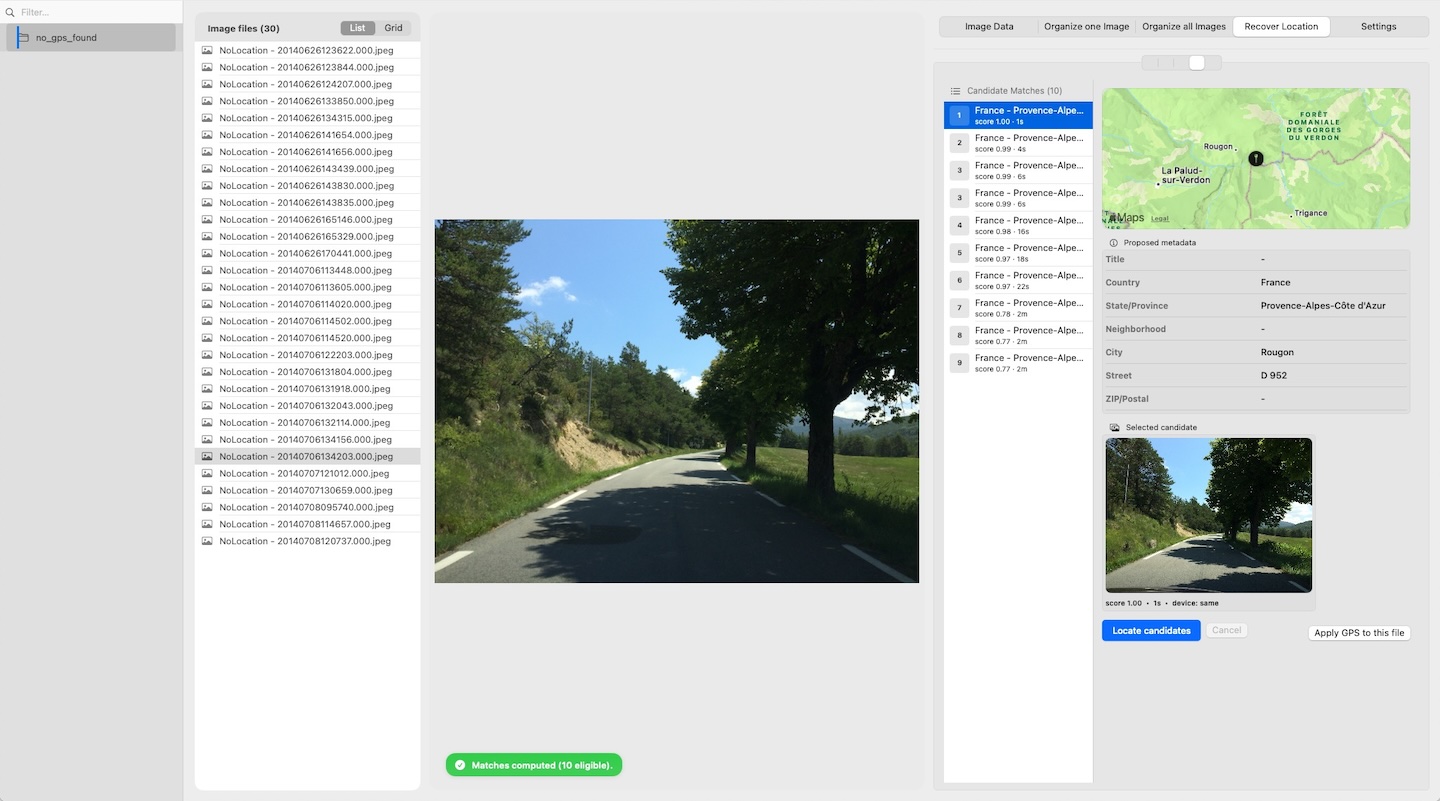
MediaOrganizer includes a Recover Location workflow for items that have no GPS. It helps identify plausible location candidates by using contextual relationships already present in the archive.
Suggestions are always presented for user review before any metadata is updated. Location recovery is never applied silently or automatically in batch.
The goal is to make missing location context reviewable and recoverable without exposing the internal rules used to generate candidates.
Metadata in the file vs metadata only in the catalog
A common confusion is assuming that location visible inside a photo app is always embedded in the file itself. That is not necessarily true.
Sometimes location exists:
- inside the file metadata, or
- only inside the catalog or library database.
For long-term portability, file-embedded metadata is structurally stronger. It can travel with the file across systems, folders, drives, and workflows.
That is one reason deterministic archive design starts from the file layer, not only from the catalog layer.
What MediaOrganizer writes back
When location has been recovered or confirmed, MediaOrganizer can write essential metadata safely to files in the Target. That may include recovered GPS and place names.
Updating description and comment fields is optional and controlled by a toggle. The app may also create a safety copy, depending on the selected option.
This means the archive can become more self-describing at the file level, while still avoiding the complexity of acting as a full metadata editor.
Why this matters before any DAM or catalog
Catalog systems are excellent at indexing, searching, and presenting media. But if the underlying archive is structurally inconsistent, the catalog often ends up absorbing that complexity.
Once the file layer itself is normalized into a deterministic structure, apps like Lightroom or Apple Photos are no longer compensating for archive drift. They are simply indexing an already coherent archive.
FAQ
Is GPS metadata always stored in EXIF?
Often yes for many photo formats, but behavior depends on the device, file type, export path, and editing workflow. Some apps preserve it, others strip or rewrite it.
What does MediaOrganizer do with files that have no GPS?
It places them in an explicit review area for missing location context when no usable location information exists, so they can be reviewed later instead of being forced into guessed locations.
Does Recover Location apply coordinates automatically?
No. Recovery is always manual. The app proposes candidates based on contextual evidence, but it never auto-applies them in batch.
Can metadata visible in a photo app exist only in the catalog?
Yes. A photo application may display location information stored in its own catalog or library database, even when the file itself does not carry that GPS metadata.
Where media normalization fits
The file-level problem described in this guide is one part of a broader media normalization workflow: establishing deterministic structure, explicit exceptions and tool-independent organization before relying on Lightroom, Apple Photos or any DAM system.
Related guides
- Recover Missing GPS Metadata from Photos
- Organize Photos Before Lightroom Import
- Consolidate Photos from Multiple External Drives
- Merge iCloud Photos with a Local Library