How to Merge Photo Folders Without Creating Duplicates
A deterministic way to combine scattered photo folders into one clean archive while making structural collisions explicit.
This guide follows a file-level media normalization approach.
Why merging photo folders becomes messy
At first, combining a few folders looks simple: copy everything into one destination and clean up later. But in real archives, that usually creates new structural problems instead of solving old ones.
Large media collections tend to accumulate across:
- old computers,
- external drives,
- camera card exports,
- phone backups,
- cloud downloads,
- editing exports and temporary folders.
If those folders are merged directly, the archive often inherits all the ambiguity that already existed in the source structure.
Why duplicates appear during folder merging
Duplicate creation during folder merging is usually not caused by one single mistake. It happens because different folders often contain overlapping history.
Typical examples include:
- the same trip copied to two different drives,
- camera imports repeated months later,
- folders renamed manually while still containing the same files,
- exported edits stored next to original captures,
- partial backups later reintroduced into the main archive.
This is why a simple copy-and-merge workflow often creates uncontrolled duplication.
Why filenames and old folder names are weak identity signals
Many photo folders depend on inherited names such as:
IMG_1234.JPGVacation 2019DCIM ExportPhotos old Mac
Those names may be useful as local context, but they are not strong enough to build a long-term canonical archive.
Different cameras can reuse the same filename patterns. Folder names often reflect old hardware or temporary decisions rather than stable archive logic.
What a deterministic merge does differently
Instead of preserving the historical folder logic of each source, a deterministic workflow treats each media file as the canonical unit.
The merge process then becomes:
- extract each source separately,
- read intrinsic metadata from each file,
- build a stable target structure from those fields,
- make structural collisions explicit instead of hiding them.
This is fundamentally different from copying folders into one larger folder.
What metadata is useful when merging folders
Strong merge workflows rely on signals that travel with the file itself. The most useful ones are:
- capture timestamp, ideally including reliable timestamp precision when available,
- GPS metadata, when present,
- device or camera identity, as additional context.
These signals are much more stable than inherited folder names.
What MediaOrganizer does when folders are merged
MediaOrganizer does not simply collapse source folders into one destination. It extracts media from each source and organizes files into a deterministic target structure.
The resulting structure is based on the file layer, not on the old folder layout.

The target becomes the canonical archive, independent from the inconsistent source folders that existed before.

How duplicates are handled safely
In long-lived archives, not every collision should be deleted automatically. Some cases require review:
- two versions of the same image,
- edited exports versus originals,
- copies with slightly different metadata,
- files that appear equivalent but should remain reviewable.
For that reason, MediaOrganizer keeps structural collisions reviewable instead of silently overwriting or removing them.
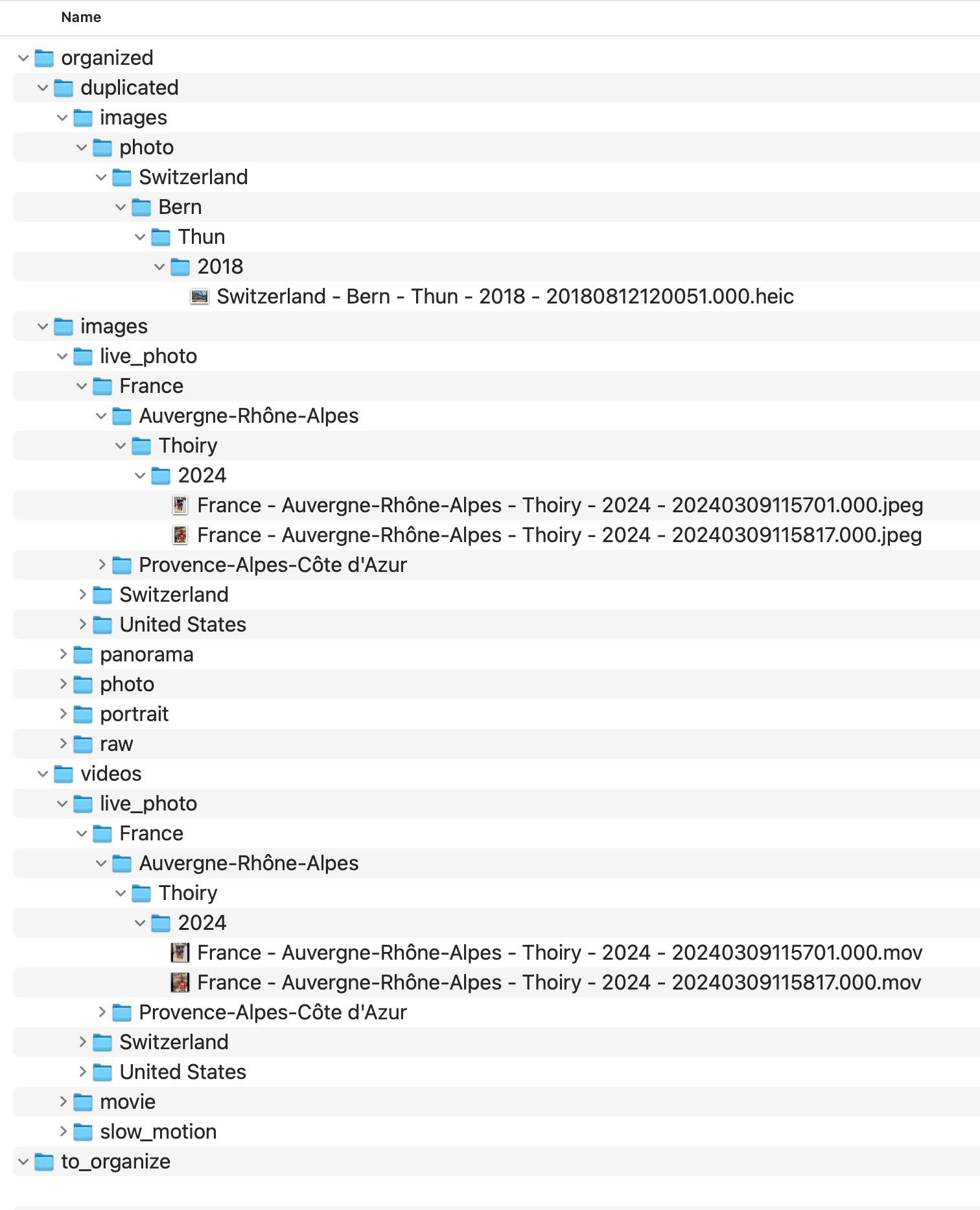
Why isolating collisions is better than blind cleanup
Blind deletion may look efficient, but it reduces transparency. In a large archive, it is often safer to preserve ambiguity explicitly and review it later than to destroy files based on incomplete assumptions.
A deterministic archive should remain understandable, auditable, and rebuildable.
What happens to files without location metadata
Merging folders also surfaces another common issue: some files have no usable GPS information. Those should not be forced into guessed locations.
MediaOrganizer keeps them explicit for later review instead of forcing guessed locations.
This keeps the archive honest about what is known and what is still uncertain.
Why this matters before any catalog or DAM
Catalog systems can index what they receive, but they do not automatically fix structural overlap inherited from years of folder-based accumulation.
Once the file layer itself has been normalized into a stable target structure, Lightroom, Apple Photos or any DAM can work on top of a coherent archive instead of compensating for folder chaos.
Safe merge principles
A safe merge should keep sources understandable, avoid destructive drag-and-drop consolidation, preserve reviewability for conflicts, and create a destination that is structurally stronger than the folders it came from.
MediaOrganizer provides this as a repeatable macOS workflow, including interface controls, logs, previewable outcomes, and local processing safeguards that are difficult to reproduce reliably with ad hoc scripts.
FAQ
Why do duplicate photos appear when I merge folders?
Because the source folders often contain overlapping history from repeated imports, backups, exports and old device migrations.
Can I just drag all folders into one destination?
You can, but that usually preserves ambiguity and often creates uncontrolled duplication. A deterministic target structure is safer for long-term archives.
Should duplicate candidates be deleted immediately?
Not usually. In large archives, isolating structural collisions first is safer than deleting automatically.
Why not rely on filenames only?
Because filenames are reused across devices and years, and they do not reliably represent long-term media identity.
Where media normalization fits
The file-level problem described in this guide is one part of a broader media normalization workflow: establishing deterministic structure, explicit exceptions and tool-independent organization before relying on Lightroom, Apple Photos or any DAM system.
Related guides
- Why Duplicate Photos Happen in Large Photo Archives
- Consolidate Photos from Multiple External Drives
- Remove Duplicate Photos on Mac
- How Photo GPS Metadata Works